Seral - Part. 1c - Basic OPNsense configuration
Do you know what VLANs are?
No???

Never too late: quick refresher.
Network plan
Segment the LAN so uses stay isolated and blast radius stays small. Five VLANs:
- VLAN_Guests — fully isolated: no talk to other VLANs, internet via VPN only. Useful when people visit.
- VLAN_Admin — containers, VMs, hypervisor services. A private cloud, basically.
- VLAN_Secure — same idea as guests, with extra distrust. Do not mix risky devices with the rest.
- VLAN_Personal — PCs, consoles, phones.
- VLAN_IOT — IoT. By default they talk neither to each other nor to the internet.
Copy this and adapt the tags if you want:
VLAN_IOT       tag 35   10.66.35.0/24   prefix-id 3
VLAN_Personal  tag 40   10.66.40.0/24   prefix-id 2
VLAN_Secure    tag 45   10.66.45.0/24   (no IPv6)
VLAN_Admin     tag 50   10.66.50.0/24   prefix-id 1
VLAN_Guests    tag 66   10.66.66.0/24   (no IPv6)
LAN                     10.66.10.0/24   prefix-id 0
DNS / gateway           10.66.10.1
VLANs
Interfaces → Devices → VLAN. Parent must be the LAN NIC (igb0 or igc0). Then Interfaces → Assignments: add each VLAN and name it VLAN_Admin, VLAN_Personal, etc.
Screenshot: VLAN devices

Interface settings
For each VLAN, Interfaces → [VLAN_XXXXX]:
- Uncheck block private networks and block bogon networks
- IPv4: Static IPv4 —
10.66.TAG.1/24 - IPv6: Track Interface — except VLAN_Secure and VLAN_Guests (leave on None)
IPv6 track settings
Under Track IPv6 Interface: parent WAN, unique prefix ID (see vlans.txt above).
Also set the DHCPv6 prefix ID on LAN.
In System → Settings → General, uncheck “Prefer to use IPv4 even if IPv6 is available”.
DHCP
A network without DHCP is sad. Services → ISC DHCPv4 → [VLAN_XXXXX], on every VLAN:
Enable DHCP server
Range:  10.66.TAG.2 – 10.66.TAG.254
DNS:    10.66.10.1
VLAN_Secure and VLAN_Guests get a different DNS story in a later article. For now they can still point at 10.66.10.1.
Firewall
Keep it simple. Idea:
- Floating: block all outbound by default (no internet, no east-west, until you pass something).
- WAN: established traffic in/out, nobody on the internet uses our DNS.
- LAN: allow all (management network).
- Per VLAN: explicit exceptions.
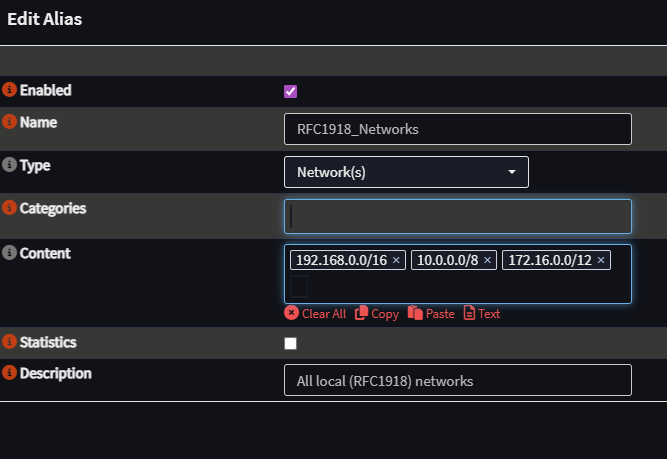
Handy alias for “is this private?” — invert it to match the rest of the internet:
192.168.0.0/16
10.0.0.0/8
172.16.0.0/12
Firewall → Aliases, then the rules.
Screenshots: WAN, LAN, alias, VLANs, floating
WAN — stop outside IPs from using our DNS; allow legitimate inbound/outbound. INTERNET_DHCP is probably WAN_DHCP on your box (or INTERNET_DHCP if you followed the m720q write-up).

LAN — allow all packets, in and out.

Alias
VLAN_Personal — no talk to VLAN_Secure; access to the others; internet allowed.

VLAN_Admin — allow all, in and out.

VLAN_Guests — no other VLANs, no internet for now.

VLAN_Secure — no VLAN_Guests, no VLAN_Personal, no internet for now.

Floating — block all outbound by default. That is what holds internet and other devices until an explicit pass exists.

DNS
Unbound as a small Pi-hole: ads, malware, some content. Plus DNS rebinding protection and DNS over TLS.
Services → Unbound DNS.
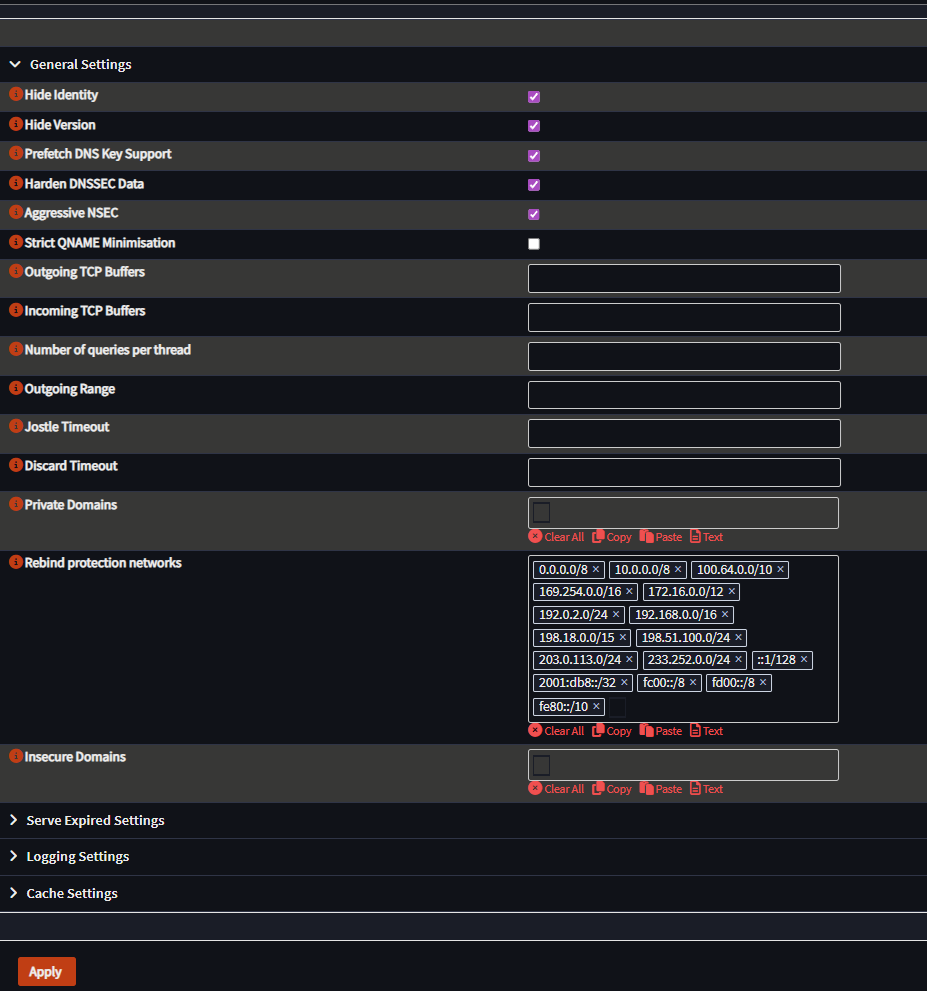
Private ranges (Advanced tab) — copy as-is:
0.0.0.0/8 10.0.0.0/8 100.64.0.0/10 169.254.0.0/16 172.16.0.0/12 192.0.2.0/24 192.168.0.0/16 198.18.0.0/15 198.51.100.0/24 203.0.113.0/24 233.252.0.0/24 ::1/128 2001:db8::/32 fc00::/8 fd00::/8 fe80::/10Blocklists I use (decent coverage vs false positives):
AdGuard List
OSID - Domain Blocklist Ads
Steven Black List
Push this DNS to clients: Services → ISC DHCPv4 → VLAN_Personal (and others you care about), DNS server 10.66.10.1. Next lease picks it up.
Screenshots: Unbound and DHCP DNS
General — Overrides is where local records will go later (private cloud).
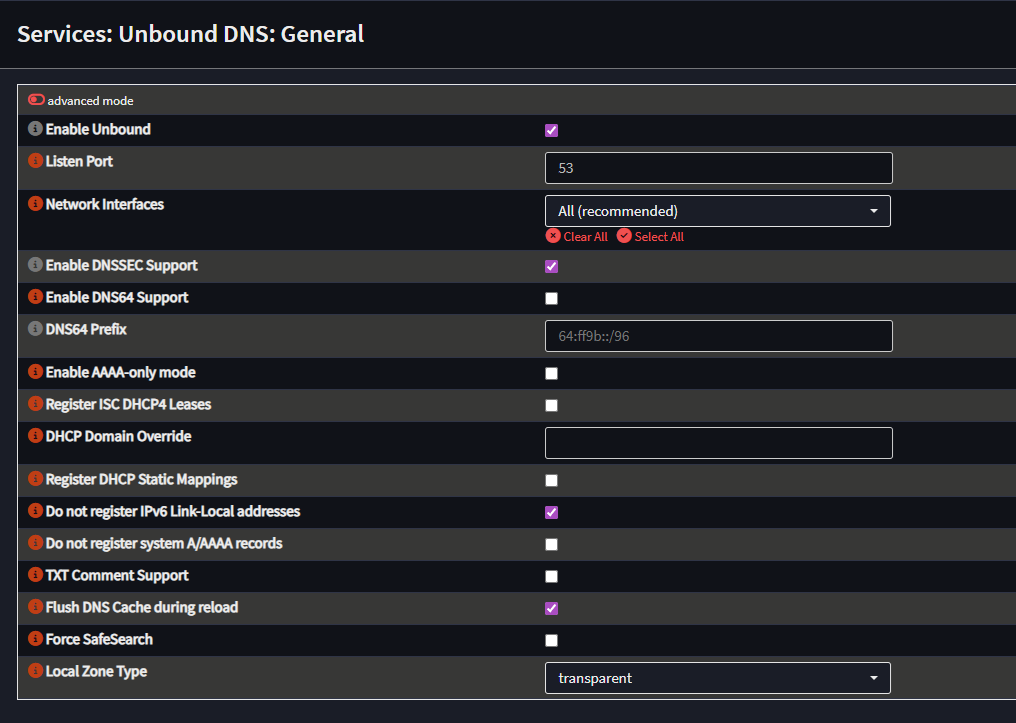
Advanced — paste the private ranges.
Blocklists — add a list, pick the three above, leave the other fields empty.
DNS over TLS — Mullvad resolvers here; we reuse them later for the always-on VPN.
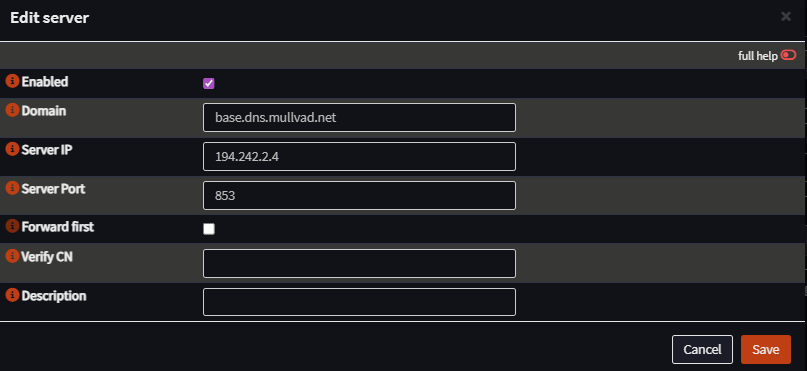
Then reboot the firewall, or restart Unbound (top right).

Next
Admin VPN, remote access, and firewall hardening
opnsense homelab privacy security vlan firewall dns unbound dns-over-tls dhcp network-segmentation
684 Words
2025-01-25 01:00 (Last updated: 2026-08-25 14:57)
314e5fc @ 2026-08-25